
Documentation for JIRA 4.3. Documentation for other versions of JIRA is available too. 

The instructions on this page describe how to upgrade an existing application link. You may want to upgrade an application link in either of the following situations:
- Your JIRA installation has been upgraded from a version which does not support/include UAL to a version that does.
For example, you may have configured Trusted Apps or OAuth relationships in a JIRA 4.2 installation (which did not include UAL) and upgraded it to JIRA 4.3 or later (which includes UAL).
- Your remote application (to which JIRA has existing application links), has been upgraded from a version which does not support/include UAL to a version that does.
For example, you had set up an application link in a JIRA 4.3 installation or later (which includes UAL) to Confluence 3.4 installation (which did not include UAL) and that Confluence installation was upgraded to Confluence 3.5 or later (which includes UAL).
On this page:
Upgrading an Application Link (Local App Upgraded to Include UAL)
When you upgrade a JIRA version that does not include UAL to version that does, you will have the option of converting any Trusted Apps or OAuth links to UAL links. Converting these links to UAL ones greatly simplifies the link configuration process.
To upgrade an application link when your local application has been upgraded to include UAL:
- After your application upgrade, navigate to the administration console.
- Click 'Application Links'. The 'Configure Application Links' screen will be displayed with the following message:
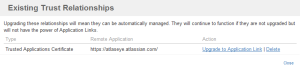
"There are existing Trusted Applications or OAuth relationships that should be upgraded to Application Links. Click here to upgrade." - Click the 'Click here to upgrade' link. The 'Existing Trust Relationships' screen will be displayed showing all Trusted Apps and OAuth relationships that can be upgraded to UAL links.
- Click the 'Upgrade to Application Link' link next to the desired trust relationship. The 'Upgrade to Application Link' wizard will be displayed.
- Complete the wizard. The process will be similar to adding a new link (described on Adding an Application Link), except that most fields should be pre-filled.

|
|

|

|
|
ステップ 1
|
ステップ 2
|
ステップ 3
|
ステップ 4
|
Screenshots above: Upgrading an application link for local application
Upgrading an Application Link (Remote App Upgraded to Include UAL)
When an application link is created between a UAL-enabled version of JIRA and a remote legacy application (either a non-Atlassian product, or an older version of an Atlassian product that did not ship with UAL), this link is configured to run in "legacy mode". While there is no distinguishable difference to a user, connecting and configuring non-UAL application links is a little different. For example:
- Setting up OAuth requires manual configuration by the administrator. In OAuth authentication for UAL-to-UAL links, exchange of the consumer keys and public keys is done automatically.
- The Trusted Applications protocol (Atlassian-specific) will not be available for authentication.
If you upgrade your remote application to a version that does include UAL, the application link will continue to work. However, upgrading your link may simplify link configuration and make additional authentication protocols available (as mentioned above).
To upgrade an application link when your remote application has been upgraded to include UAL:
- After you have upgraded your remote application to a version that includes Application Links, go to the administration console of your local application. A warning will be displayed, requesting that you upgrade the link to full Application Links mode.
- Click 'Upgrade' in the warning message to start the upgrade wizard. Note the following:
- You will be prompted to make your application link a reciprocal link. You will need to provide administrator credentials for your remote application, if you choose to do so.
- If you make your application link a reciprocal link, you will also be able to make reciprocal links for your project links. For example, you may be able to link your JIRA project to a FishEye repository and also make a link from your FishEye repository back to the JIRA project.

Screenshot above: Upgrading an application link for remote application

Screenshot above: Upgrading an application link wizard
注意
関連トピック
Adding an Application Link
Configuring Authentication for an Application Link
概要
コンテンツ ツール
アプリ


See our Getting Help page for details.

Raise an issue for our developers.

See answers from the community.

Tweet, blog and update our documentation.
 Except where otherwise noted, content in this space is licensed under a Creative Commons Attribution 2.5 Australia License.