
Confluence 5.4 のサポートは終了しています。
ドキュメントの最新バージョンを確認してください。
This page is about Confluence mobile web. If you're a Confluence Cloud customer, head over to our Cloud documentation to find out about the Confluence iOS app.
When you view a Confluence page on a mobile device, such as an iPhone, iPad or Android device, Confluence will display an optimised version of the page. Confluence chooses the mobile or desktop interface based on your device. See Supported Platforms for details of supported mobile devices.
サポートされているモバイルデバイスでは、次のことができます。
- Confluence ダッシュボード、ページ、ブログ投稿、およびユーザー プロファイルの表示。
- ページやブログ投稿で、コメントの追加、および返信。
- ページ、ブログ投稿、またはコメントにいいね!をマーク。
- ページまたはブログ投稿をウォッチ。
- 個人のタスクと通知の管理
You cannot add or edit pages or blog posts, or edit existing comments, using the mobile interface.
ダッシュボード – 最初に表示されるもの
Screenshot: The dashboard in Confluence mobile

各タブで表示される内容:
- 人気コンテンツ – Wiki で人気の内容。
- 最新のブログ – 最新のブログ投稿。
- ネットワーク – ネットワーク内のピープルによる更新
ページ、ブログ投稿、またはコメントの完全なコンテンツを表示するにはリンクをタップします。
コンテンツと人の検索
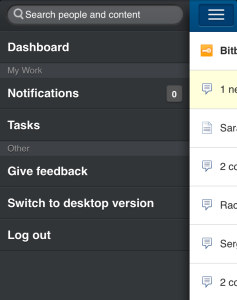
Tap the menu icon  to open the menu panel on the left of the page. Then type text or a person's name in the Search box. The mobile interface offers the quick navigation search, which returns matches on page title only. (See Searching Confluence.) To use the full search, switch to desktop mode.
Screenshot: The menu panel in Confluence mobile
ページ、ブログ投稿、およびコメントの表示
ダッシュボードまたはその他のページでリンクをタップします。Confluence により、リンクページ、ブログ投稿、またはコメントが表示されます。
以下のことが可能です。
- コンテンツを表示し、リンクをタップして別のページに移動し、モバイルブラウザでサポートされている標準機能を使用してページと対話します。
- ページ、ブログ投稿、またはコメントにいいね!を付けたり、取り消したりします。
- ページまたはブログ投稿のウォッチを開始、また停止する。
- Add or reply to a comment. Confluence mobile supports plain-text comments only.
Screenshot: A page showing Like, Watch and Comment options.

ユーザー プロファイルの表示
ユーザーの名前を検索して、そのユーザー プロファイルを表示します。オプションをタップして、モバイルデバイスから直接同僚に電話、SMS、またはメール送信を行います。
Screenshot: A user profile on Confluence mobile

通知のフォローアップ
You can view and respond to your notifications on your phone or other mobile device. Tap the menu icon to open the menu panel on the left of the page. Choose Notifications, and tap a notification to see its details. You can reply, watch or like via the inline actions. Tap Open to open the page or blog post in a new page. For full details, see Managing Notifications in Confluence.
Screenshot: Notifications in Confluence mobile

Managing tasks
You can view and manage your tasks on your phone or other mobile device too. Tap the menu icon to open the menu panel on the left of the page. Choose Tasks, and tap the plus sign  to add a new task. Tap a task to see its details. You can add notes, complete a task, and tap a link to open the related page. For full details, see Managing Tasks in Confluence.
Screenshot: Tasks in Confluence mobile

その他の情報
ネイティブ Confluence モバイルアプリケーション
The Confluence iOS app is available for Confluence Cloud sites only. It cannot be used with Confluence Server.
Confluence Server へはあらゆるデバイスからブラウザーを使用してアクセスできます。Confluence はご使用のデバイスのサイズを検出し、必要に応じてモバイル Web バージョンに切り替えます。
See Notes about Confluence Mobile.
関連ページ
概要
コンテンツ ツール
アプリ
 Except where otherwise noted, content in this space is licensed under a Creative Commons Attribution 2.5 Australia License.