
Documentation for JIRA 4.4. Documentation for other versions of JIRA is available too. 

This page describes how to set Java properties and options on startup for JIRA Standalone and WAR distributions.
On this page:
Linux
Linux インストールでシステム プロパティを設定する方法
- From
<jira-install>/bin(Standalone) or<Tomcat-home>/bin(WAR installation), open setenv.sh. - JVM_SUPPORT_RECOMMENDED_ARGS= セクションを探します。
- 下記のパラメーター一覧を参照してください。
 引用内部では、各パラメーターをスペース区切りのリスト形式で追加します。
Windows (.batファイルから起動)
Windowsインストールで .bat ファイルから起動する際にシステム プロパティを設定する方法
- From
<jira-install>/bin(Standalone) or<Tomcat-home>/bin(WAR installation), open setenv.bat. - set JVM_SUPPORT_RECOMMENDED_ARGS= セクションを探します。
- 下記のパラメーター一覧を参照してください。
引用内部では、各パラメーターをスペース区切りのリスト形式で追加します。
Windows サービス
There are two ways to configure system properties when starting Running JIRA Standalone as a Service, either via command line or in the Windows Registry
Windows サービスのプロパティをコマンド ラインから設定する
Windows サービスのプロパティをコマンド ラインから設定する
- Identify the name of the service that JIRA is installed as in Windows (
Control Panel > Administrative Tools > Services):
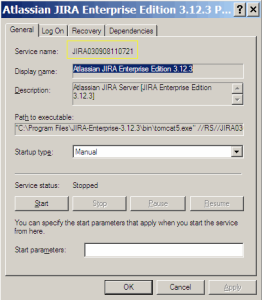
In the above example, the SERVICENAME is: JIRA030908110721 Start >> Run >> type in 'cmd' >> Enterでコマンド ウィンドウを開きます。cdto thebindirectory of your JIRA Standalone instance, or thebindirectory of your Tomcat installation if your are running JIRA WAR.- 次のコマンドを実行します。
.
tomcat6w //ES//%SERVICENAME%
In the above example, it would be tomcat6w //ES//JIRA030908110721

- Click on the
Javatab to see the list of current start-up options:
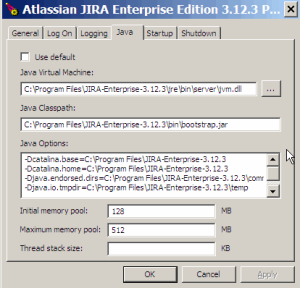
- 新しいオプションを追加する場合は、既存の Java オプションの最後に新しい行として追加します。以下のパラメーター一覧を参照してください。
Windows レジストリで Windows サービスのプロパティを設定する
Windows の一部のバージョンには、Java 変数をサービスに追加するオプションがありません。この場合、レジストリ内のオプション一覧を表示してプロパティを追加する必要があります。
Windows サービスのプロパティを Windows レジストリで設定する方法
- Go to {{Start >> Run, and run "regedit32.exe".
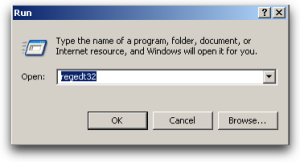
- Find the Services entry:
32-bit:HKEY_LOCAL_MACHINE >> SOFTWARE >> Apache Software Foundation >> Procrun 2.0 >> JIRA
64-bit:HKEY_LOCAL_MACHINE >> SOFTWARE >> Wow6432Node >> Apache Software Foundation >> Procrun 2.0 >> JIRA
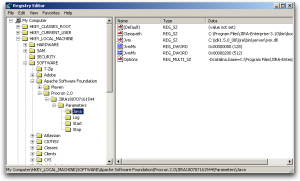
- 既存のプロパティを変更する (特に Xmx メモリを増やす) には、適切な値をダブルクリックします。

- 追加のプロパティを変更するには、オプションをダブルクリックします。
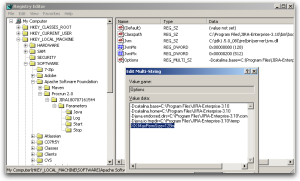
- 以下のパラメーター一覧を参照してください。各行に1つずつ入力します。
設定を確認する
設定した内容を確認するには、<jira-home>/logs/atlassian-jira.log または catalina.out ファイルを確認します。起動部分のセクションは次のようになっています。
JVM Input Arguments : -Djava.util.logging.config.file=/usr/local/jira/conf/logging.properties -XX:MaxPermSize=256m -Xms256m -Xmx384m -Djava.awt.headless=true -Datlassian.standalone=JIRA -Dorg.apache.jasper.runtime.BodyContentImpl.LIMIT_BUFFER=true -Dmail.mime.decodeparameters=true -Djava.util.logging.manager=org.apache.juli.ClassLoaderLogManager -Djava.endorsed.dirs=/usr/local/jira/endorsed -Dcatalina.base=/usr/local/jira -Dcatalina.home=/usr/local/jira -Djava.io.tmpdir=/usr/local/jira/temp
This display is also available by Viewing your System Information.
List of Startup Parameters
Memory Property |
注意 |
Related Pages |
|---|---|---|
-Xmx |
これらのプロパティはすでに存在します。詳しくは関連ページを参照してください。 |
|
-XX:+PrintGCTimeStamps -verbose:gc -Xloggc:gc.log -XX:+HeapDumpOnOutOfMemoryError |
ガベージ コレクションのチューニングの際に設定します。 |
Troubleshoot Jira Server performance with GC logs |
-agentlib:yjpagent=onexit=memory,dir=/path/to/write/snapshots |
|
|
Mail Property |
注意 |
Related Pages |
-Datlassian.mail.senddisabled |
Set to 'true' to disable mail. In Linux setenv.sh, there is a pre-existing flag to uncomment. |
Migrating JIRA to Another Server |
-Dmail.debug |
"true" に設定すると、メールに関する情報がログに記述されます。 |
Configuring JIRA to Send SMTP Mail |
-Dmail.mime.decodetext.strict |
|
|
-Dmail.imap.auth.plain.disable |
|
OAuth を使用する際に、Jira Server のログで IMAP セットアップが AUTHENTICATE Failed エラーで失敗する |
-Dmail.imap.starttls.enable |
|
"No login methods supported error" により、Jira サーバーで IMAP サーバーからメッセージを取得できない |
-Dmail.mime.decodeparameters |
RFC 2231 準拠のメール クライアントからのメールに対して適切に動作するようにメール ハンドラを設定します。 |
Installing JIRA WAR-EAR |
-Dmail.smtp.localhost |
|
|
Encoding Property |
注意 |
Related Pages |
-Dfile.encoding |
エンコーディングの一貫性のため、utf-8 に設定します。 |
Integrating JIRA with CVS and ViewCVS |
その他のプロパティ |
注意 |
Related Pages |
-Djira.trackback.senddisabled |
When set to true, disables trackbacks |
|
-Duser.timezone |
|
|
-Dsvnkit.http.methods |
Basic、Digest、Negotiate、NTLM を含む値 |
(Archive) JIRA Startup Fails Due to 'java.lang.SecurityException Unable to locate a login configuration' |
-Dorg.apache.jasper.runtime.BodyContentImpl.LIMIT_BUFFER |
false |
|
-ea/-da |
アサーションを有効化 / 無効化 |
|
-Djava.net.preferIPv4Stack |
|
|
-Djavax.net.ssl.trustStore |
|
Connecting to SSL services |
-Djava.awt.headless |
デフォルトで true。サムネイルの生成を許可します |
|
概要
コンテンツ ツール
アプリ


See our Getting Help page for details.

Raise an issue for our developers.

See answers from the community.

Tweet, blog and update our documentation.
 Except where otherwise noted, content in this space is licensed under a Creative Commons Attribution 2.5 Australia License.