
Exporting an Advanced Roadmaps Plan to Submit to Support
When contacting Atlassian Support for help with your instance of Advanced Roadmaps, it is wise to include an anonymized export of the Plan (or Plans) you are working with along with a Support Zip from your underlying JIRA instance. This will allow the support engineers working on your ticket to try to reproduce the issue you are experiencing and will greatly improve your time to resolution.
To export an an anonymized export of a Plan:
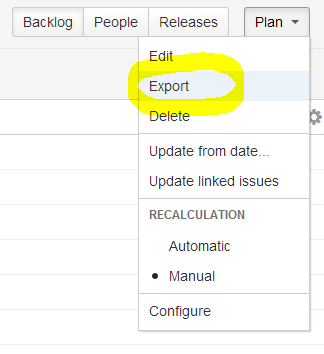
- Navigate to Plan (in the upper right of the Advanced Roadmaps Screen) > Export.
- In the pop-up, select Render data anonymous. De-select Include Issue links unless otherwise instructed by a support engineer.
- Press Export.
Your plan will be exported into XML format into your browser's specified Downloads location. You can now attach it to your open support ticket.
最終更新日 2020 年 7 月 21 日
Powered by Confluence and Scroll Viewport.