
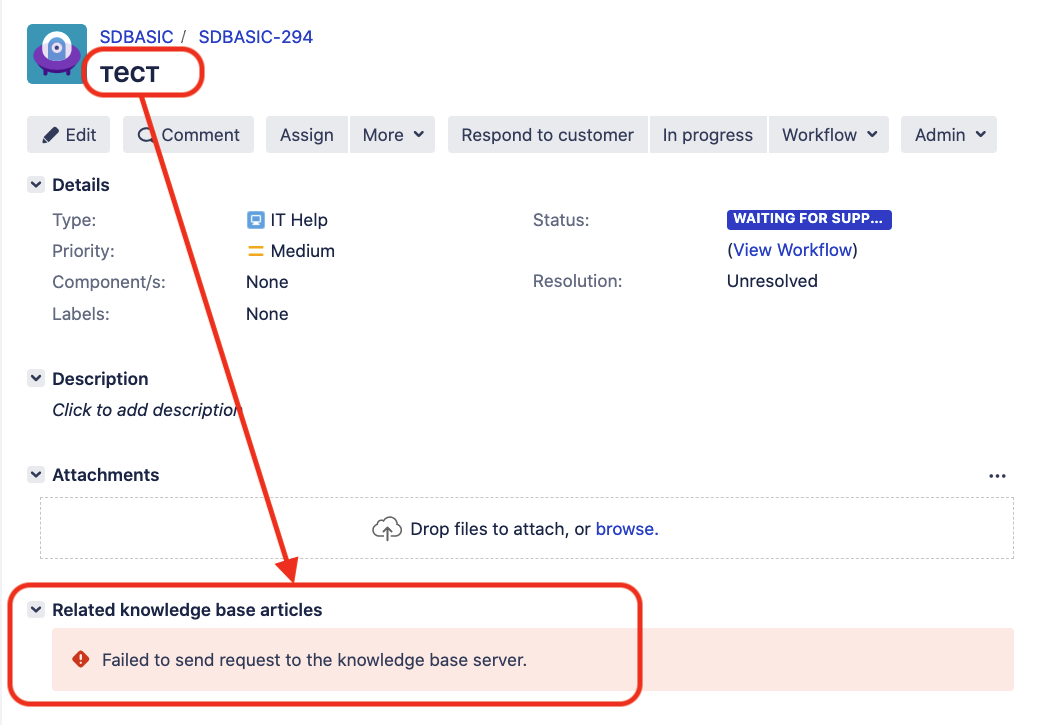
Error "Failed to send request to the knowledge base server."
プラットフォームについて: Data Center - この記事は、Data Center プラットフォームのアトラシアン製品に適用されます。
このナレッジベース記事は製品の Data Center バージョン用に作成されています。Data Center 固有ではない機能の Data Center ナレッジベースは、製品のサーバー バージョンでも動作する可能性はありますが、テストは行われていません。サーバー*製品のサポートは 2024 年 2 月 15 日に終了しました。サーバー製品を利用している場合は、アトラシアンのサーバー製品のサポート終了のお知らせページにて移行オプションをご確認ください。
*Fisheye および Crucible は除く
問題
When accessing a Jira Service Management ticket in Agent View (Jira Issue View) an error "Failed to send request to the knowledge base server." is showing:
atlassian-confluence.log に次のメッセージが出力される。
2017-11-23 18:33:39,000 WARN [http-nio-9443-exec-3] [oauth.serviceprovider.internal.AuthenticatorImpl] logOAuthProblem Problem encountered authenticating OAuth client for url "https://<Conf Base URL>/rest/knowledge-base/1.0/search/DES", error was "signature_invalid", with parameters "{oauth_problem=signature_invalid, oauth_signature=dJ3ISkCwaZAYVTbznFMTN7y5hOjQhYo4FacKXbXx/GjstunywjozphS28lg+mib8K07nUZ03ltHz/sRskmLYBDRdJb2uNeZ174vgCm4QTYTpw/3HzL/y/2Zb7GZodSXYhjouS2438=, oauth_signature_base_string=GET&https%3A%2F%2F<Conf Base URL>%3A<port>%2Frest%2Fknowledge-base%2F1.0%2Fsearch%2FDES&highlight%3Dfalse%26oauth_consumer_key%3Djira%22c-7061-4a85-a813-be2cc9b66748%26oauth_nonce%3D2311910188949047%26oauth_signature_method%3DRSA-SHA1%26oauth_timestamp%3D1511458418%26oauth_token%3D%26oauth_version%3D1.0%26permissionCheckedUser%3Dmagda%2540jira.something.com%26queryString%3Dwyr%25C3%2583%25C2%25B3wnanie%2520zasi%25C3%2585%25C2%2582ku%2520macierzy%25C3%2585%25C2%2584skiego%2520z%2520bud%25C3%2585%25C2%25BCetu%2520pa%25C3%2585%25C2%2584stwa%26type%3Dpage%26xoauth_requestor_id%3Dadmin, oauth_signature_method=RSA-SHA1}"
 -- url: /rest/knowledge-base/1.0/search/DES | traceId: 94fcb14e434
診断
- Jira and Confluence Application Link is using SSL/HTTPS
- The ERROR appears in Jira Tickets that have special characters in its Summary
- Check if Jira and Confluence has the following parameter set in the respective instance
server.xml
useBodyEncodingForURI="true"原因
The cause of the issue is the mentioned parameter above where it needs to be "false"
ソリューション
As mentioned before, we would need to set the value to "false" in order to solve the issue. The steps are:
- Find the and edit the instance
server.xmlhas the parameter set.- Jira Installation Directory > conf > server.xml
- Confluence Installation Directory > conf > server.xml
Find the parameter:
useBodyEncodingForURI="true"Change the value to
"false"useBodyEncodingForURI="false"- Save the file and restart the instance to take effect.