
Automation rule not triggered when using the field value changed trigger and custom field with special characters
プラットフォームについて: Data Center - この記事は、Data Center プラットフォームのアトラシアン製品に適用されます。
このナレッジベース記事は製品の Data Center バージョン用に作成されています。Data Center 固有ではない機能の Data Center ナレッジベースは、製品のサーバー バージョンでも動作する可能性はありますが、テストは行われていません。サーバー*製品のサポートは 2024 年 2 月 15 日に終了しました。サーバー製品を利用している場合は、アトラシアンのサーバー製品のサポート終了のお知らせページにて移行オプションをご確認ください。
*Fisheye および Crucible は除く
要約
The automation rule doesn't get triggered. This happens for one specific rule that uses the trigger Field value changed. Other rules are not affected. The custom field contains special characters.
環境
Jira 8.x, 9.x ,10.x with A4J (Automation For Jira)
診断
When checking on the rule, the trigger Field value changed has not been selected from the drop-down list of selectable fields. Instead the option to match the custom field name has been used. The custom field contains characters such as for example:
(){}[]Example in Jira: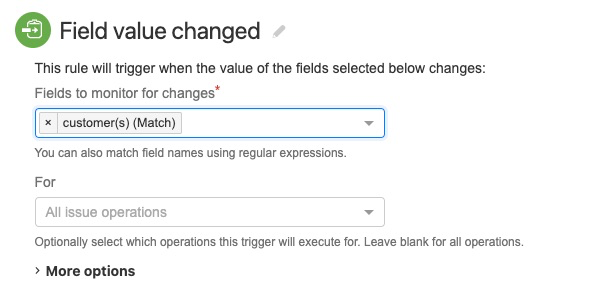
With the custom field name customer(s) this rule would not get triggered.
原因
When using the option to match the custom field name, Jira makes use of the regex rules. Regular Expressions or regex make use of patterns and wildcards. The special characters in the name of the custom field are part of these special characters also known as metacharacters. To make sure the characters are correctly identified, they will need to be escaped.
ソリューション
You will need to escape the special characters using the \
例:
| custom field name | in rule |
|---|---|
| customer(s) | customer\(s\) |
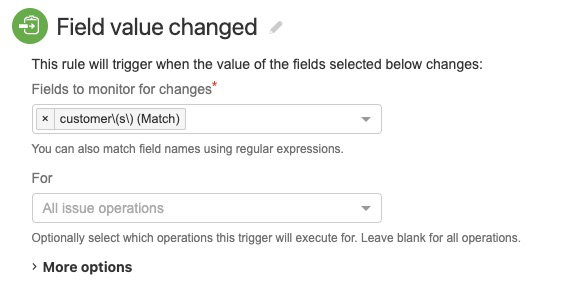
With the custom field name customer(s) this rule would get triggered.
You can make use of Regex101 or other regex testers to verify that the custom field name would be matched.