This page provides information about aspects of running the Stash installer. For high-level information about installing and using Stash see Getting started.
The installer will:
- install Stash into a fresh directory (note that installer does not perform an in-place upgrade).
- install a supported version of the Java JRE, which is only available to Stash, if necessary.
- launch Stash when it finishes.
Stash をサービスとしてインストールする
On Linux and Windows systems, the installer can install Stash as a service.
A service account named 'atlstash' will be created.
Linux の場合
- The 'atlstash' account will be a locked account (it cannot be used to log in to the system).
The init.d script will be linked to run levels 2, 3, 4 and 5. If you wish to change this, you will need to configure it manually.
Windows の場合:
The installer generates a password for the service account. As a Windows administrator, you can update the account password if you wish to own the account. You'll also need to update the log on credentials for the service:
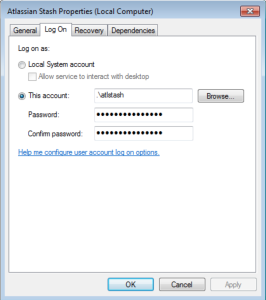
The 'atlstash' account will be configured with SeServiceLogonRight so that it can be used by the service. It will also be configured with SeDenyBatchLogonRight, SeDenyInteractiveLogonRight, SeDenyNetworkLogonRight, and SeDenyRemoteInteractiveLogonRight so that it cannot be used to log into the machine.
Console and unattended mode
The Stash installer has three modes:
- GUI mode: the default mode for the installer is to display a GUI installer.
- Console mode: if the installer is invoked with the -c argument, the interaction with the user is performed in the terminal from which the installer was invoked.
- Unattended mode: if the installer is invoked with the -q argument, there is no interaction with the user and the installation is performed automatically with the default values.
Unattended mode also allows you to supply a response file with a -varfile option, to supply answers for all questions that are used instead of the defaults. An example response file is:
 // Should Stash be installed as a Service? Must be ADMIN (default: true if the process is running with administrator rights, false otherwise). If false, the home and installation directories must be specified to point to directories owned by the user
app.install.service$Boolean=true

// The ports Stash should bind to (defaults: portChoice=default, httpPort=7990, serverPort=8006)
portChoice=custom
httpPort=7990
serverPort=8006


// Path to the Stash HOME directory (default: /var/atlassian/application-data/stash if the process is running with administrator rights, ~/atlassian/application-data/stash otherwise)
app.stashHome=/var/atlassian/application-data/stash


// The target installation directory (default: /opt/atlassian/stash/<VERSION> if the process is running with administrator rights, ~/atlassian/stash/<VERSION> otherwise)
sys.installationDir=/opt/atlassian/stash/<VERSION> |
For more information see this page.