
Unable to import objects for object type X with id X due to null value encountered - Asset Object Schema import
プラットフォームについて: Data Center - この記事は、Data Center プラットフォームのアトラシアン製品に適用されます。
このナレッジベース記事は製品の Data Center バージョン用に作成されています。Data Center 固有ではない機能の Data Center ナレッジベースは、製品のサーバー バージョンでも動作する可能性はありますが、テストは行われていません。サーバー*製品のサポートは 2024 年 2 月 15 日に終了しました。サーバー製品を利用している場合は、アトラシアンのサーバー製品のサポート終了のお知らせページにて移行オプションをご確認ください。
*Fisheye および Crucible は除く
問題
While attempting to import an Insight Schema, you may find many objects not being imported on the target.
The following appears in the insight_objectschema_import. log
2021-10-14 15:14:08,918 [insight-InsightThreadGroup-worker-thread-1] | Unable to import objects for object type AD User 1 with id 19 due to null value encountered on line 2 on column 6
2021-10-14 15:14:08,918 [insight-InsightThreadGroup-worker-thread-1] | Invalid reference found, object key from export: ITSM-19
2021-10-14 15:14:08,918 [insight-InsightThreadGroup-worker-thread-1] | Finished object key lookup for objectId: 24, reference objects length: 1
2021-10-14 15:14:08,918 [insight-InsightThreadGroup-worker-thread-1] | No valid references for attribute type 107
環境
All Insight/Assets versions
JSM 4.14 and until 8.20.2
原因
In the source instance, at some point, some attributes were required after objects were already created. Therefore some of the objects may not have those attributes populated.
- Their Cardinality value to minimum 1.
This doesn't break any existing objects, but if you try to edit them in the Source then they will display an error until those values are populated.
If one object fails, it does not continue for next rows on the same Object Type csv file leading to an incomplete import on target.
It is a known behavior that is being tracked in the bug report JSDSERVER-10800 - Incomplete Insight Schema Import (fixed in JSM 4.20.2)
診断
You need to identify what objects are invalid on the source to import them successfully later on the target. To do so, let's have a look at the following example as it will be helpful to go through the troubleshooting steps.
ソース インスタンス
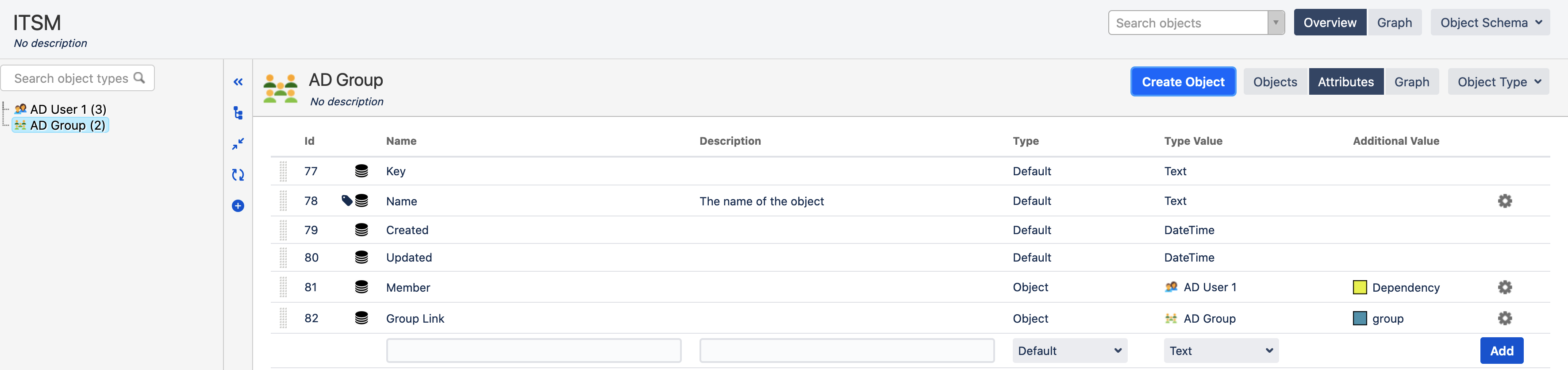
- Object Types, at this point, none of the attributes are required except the Object Name.

- Some objects are already created.
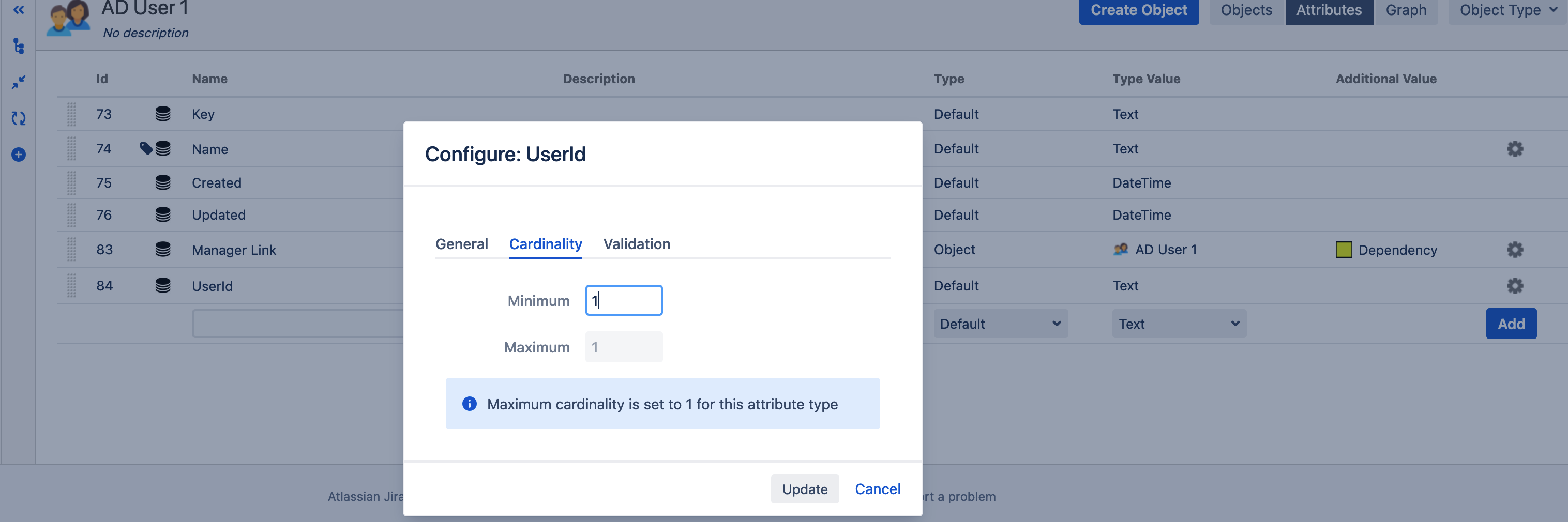
- On Object Type "AD User 1", set Cardinality value to minimum 1.
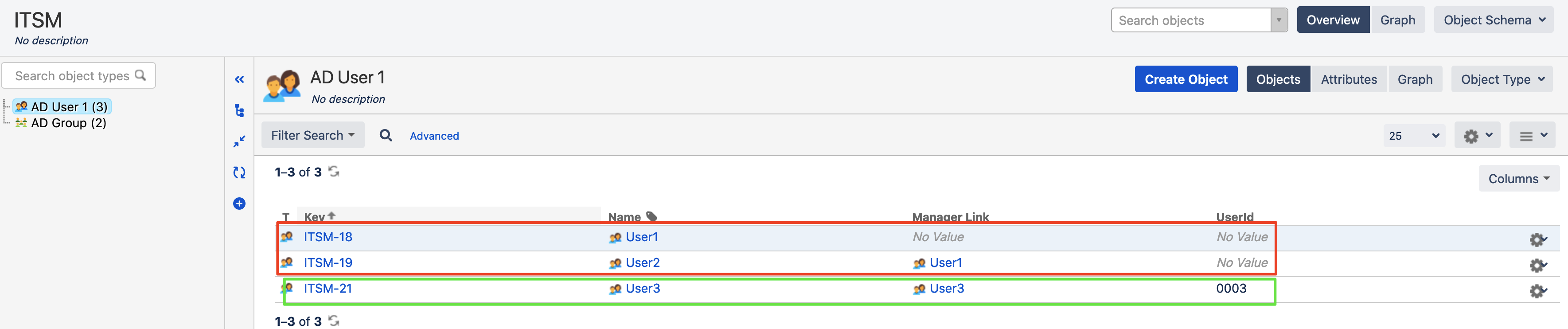
- Some other "AD User" objects will be created and they will have the 'UserId' attribute required.
- The schema export will succeed.
- After the Schema import we observed that few objects were missing on the target.

ソリューション
1. The following appears in the insight_objectschema_import. log.
2021-10-14 15:14:08,918 [insight-InsightThreadGroup-worker-thread-1] | Invalid reference found, object key from export: ITSM-19
2021-10-14 15:14:08,918 [insight-InsightThreadGroup-worker-thread-1] | No valid references for attribute type 107
2. In the target instance, locate the Object Type attribute 107. In our case, attribute 'Member'.
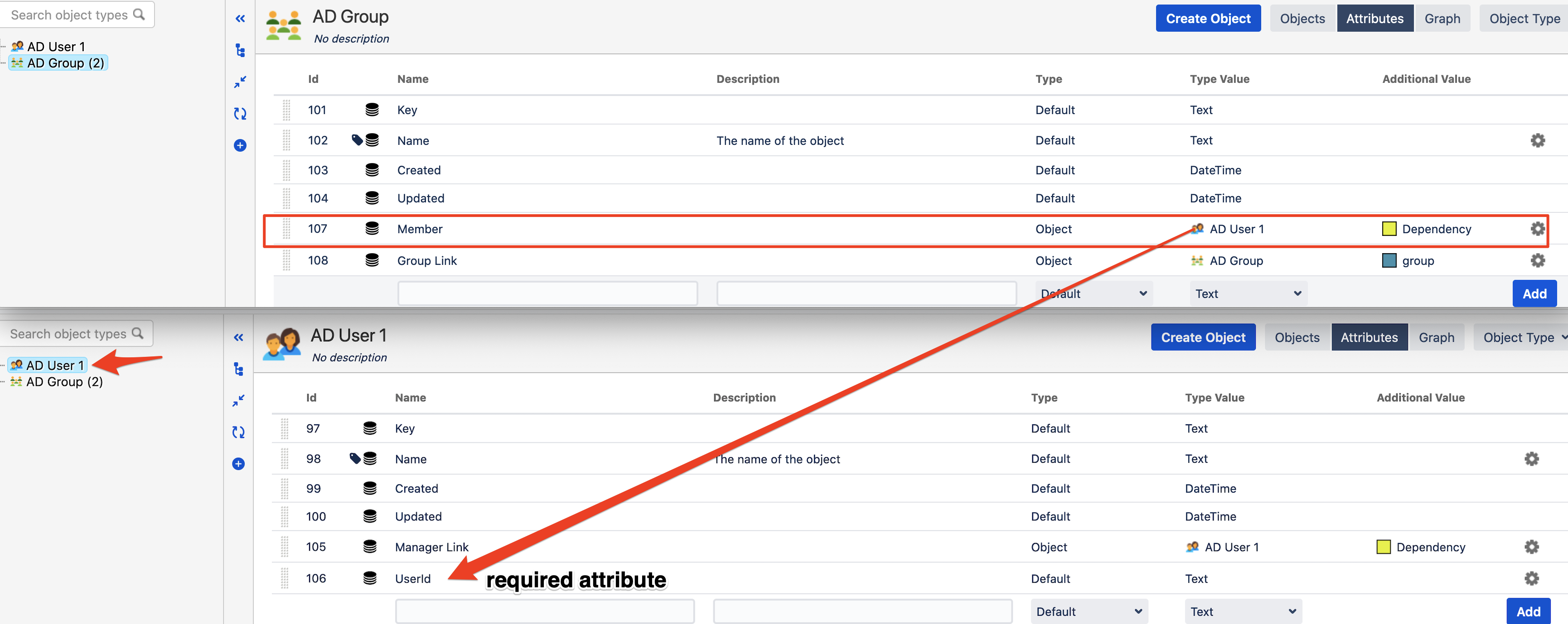
3. The attribute 'Member' has an Outbound reference to "AD User 1" Object Type.
4. Unzip the Schema export, open the schema.xml file and search for 'AD User 1'. This will give you the csv file ID. In this example it is 15.
<id>15</id><name>AD User 1</name>5. In the Schema export directory, open the file 15.csv.
6. You will need to fix all objects where the required attributes (UserId in this case) are empty. This can be done either:
- In the source instance, ensure that every object has a value for those required attributes. After that, you can export the schema again.
- Open the csv file as text and remove those objects that are no longer needed. After that, you can import the schema again.
